Selling on P2P is how you turn USDT into money in your own bank account or mobile wallet when the Send tab doesn’t offer your currency, or when a buyer’s rate is better. A buyer pays you directly; RedotPay holds your USDT in escrow until you confirm the money has arrived; then you release it. The one rule that matters: release only after you’ve seen the money in your own bank or wallet app.
Who can sell, and where
- Anyone with a verified identity can take an ad on the marketplace. Posting your own ads needs Advertiser status, and that varies by region. RedotPay also asks you to switch on at least one two-factor method (email, Google Authenticator or a security key) before trading; you’ll need it to release.
- Countries. RedotPay says P2P works in more than 100 countries and regions, and names a sample that includes Bangladesh, the UAE and Bahrain, but doesn’t publish the full list. Availability depends on local regulation and on which payment methods exist for your currency. Open P2P and tap the currency button: if your currency is listed, you can trade. Our country pages note what we’ve seen for each market.
- Payment methods. RedotPay says the marketplace supports over 200 payment options. Buyers pay you with one you’ve added, so set that up first.
Set up a payment method first
This is the account the buyer will pay into. From the official guide:
- Tap More → P2P.
- Tap Profile in the navigation bar, then Payment Method.
- Tap Add Payment Method. Pick a common method, or tap All Payment Methods to browse, for example your bank or a mobile-money wallet.
- Enter the details, tap submit and complete the two-factor check.
Two rules from the code of conduct: the receiving account must be in the same name as your verified RedotPay account, and adding several methods matches you with more buyers. Prefer instant methods; a buyer who wants to use a non-instant one is supposed to ask you first.
Selling USDT, step by step
- 1Pick an adSell → USDT → a buyer's ad: payment method, time limit, terms
- 2Place the orderAmount or Quantity, then Sell with 0 fees. Your USDT is locked in escrow
- 3Wait for paymentThe buyer pays your account. Chat stays inside the order
- 4Check your bankIn your own banking or wallet app, not from a screenshot
- 5ReleaseConfirm payment → Confirm → two-factor check
- Open P2P (from More), tap Sell and choose USDT. The ad list shows each buyer’s payment methods, payment time limit and conditions. Read them before you pick.
- Tap Sell on the ad. Under Amount, enter how much local currency you want to receive, or under Quantity how much USDT you want to sell.
- Tap Sell with 0 fees. The order is created and your USDT is locked in escrow. “0 fees” means RedotPay takes nothing; the buyer’s rate is the price.
- Wait for the buyer to pay you through the method on the order. Tap Chat if you need to talk; keep every message there.
- When the app tells you the buyer has paid, open your bank or wallet app and check that the money is actually in your account, and that the payer’s name matches the details on the order.
- Only then tap Confirm payment, then Confirm, and complete the two-factor check. The USDT goes to the buyer and the order is complete.
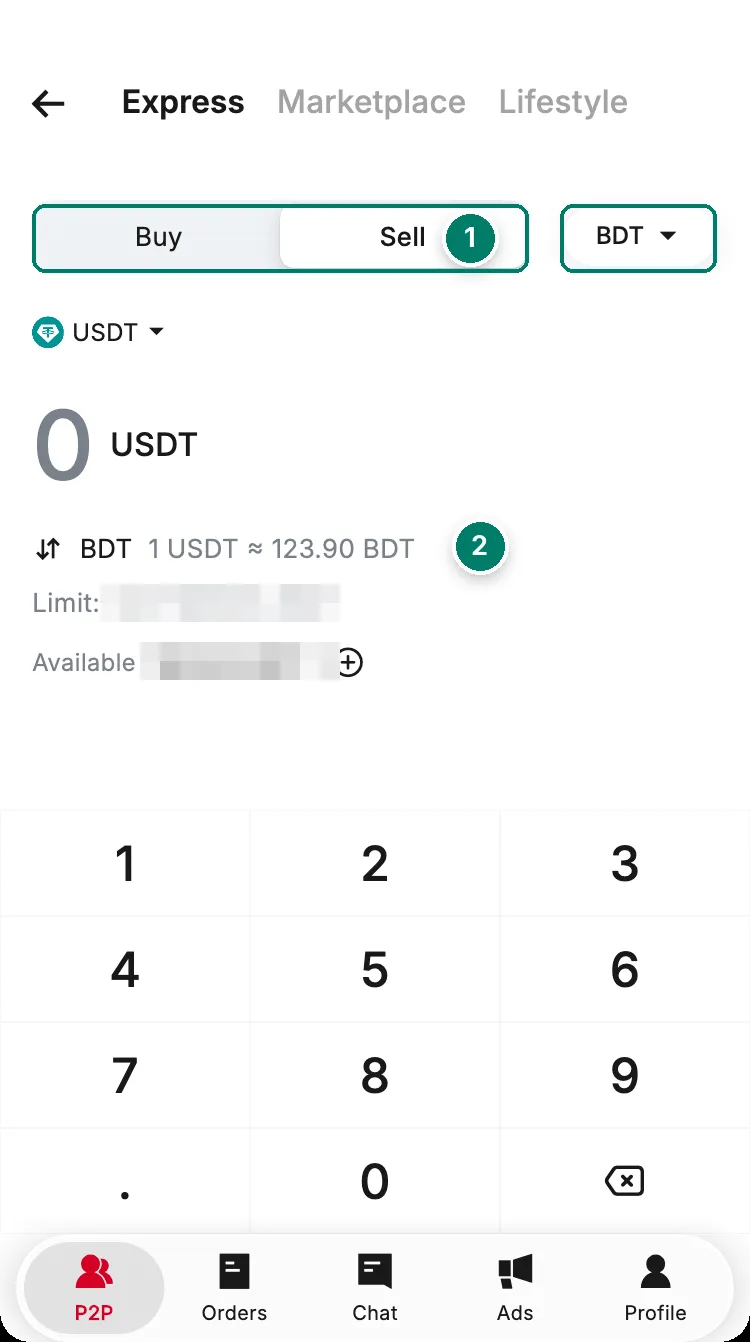
- Switch to Sell. Express matches you with an ad automatically.
- The rate and the amount you can sell right now.
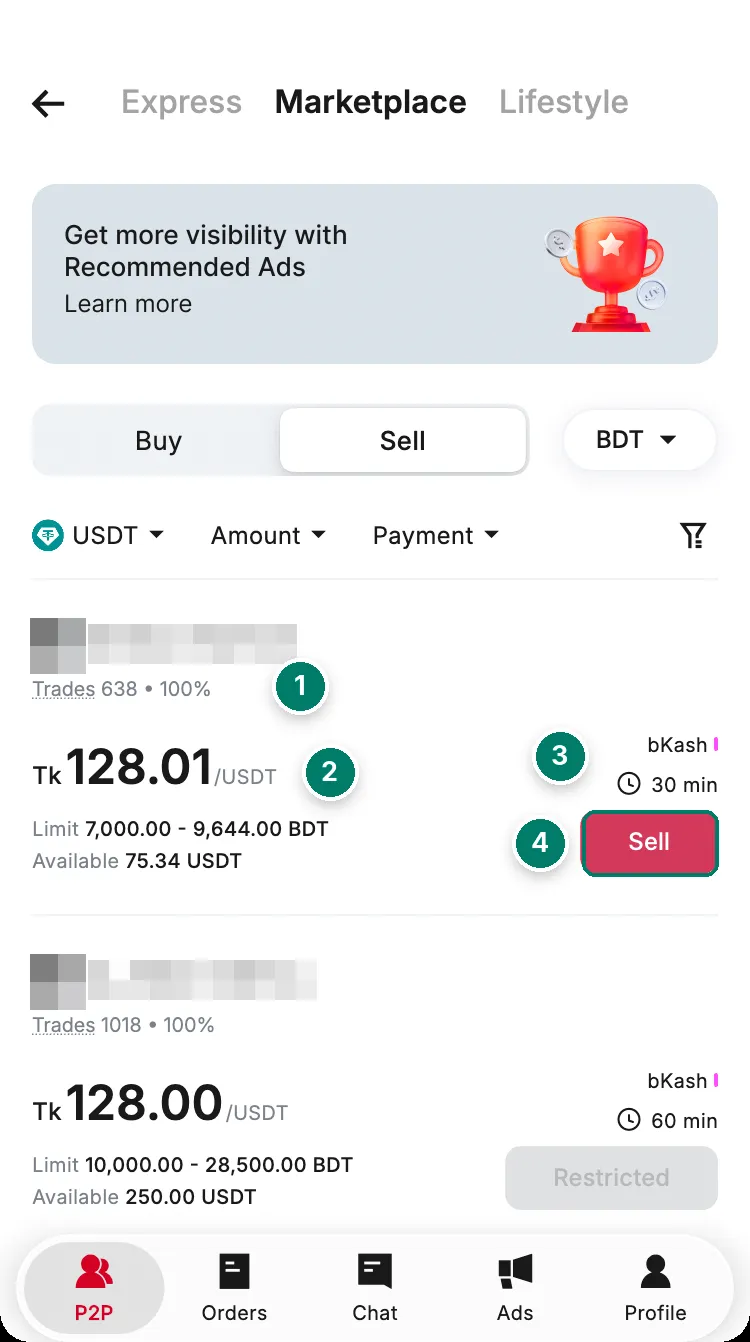
- The buyer's completed trades and completion rate.
- The price you get per USDT.
- How the buyer pays, and how long they have.
- Sell opens the order with this buyer.
The escrow and what RedotPay promises
- Escrow. Your USDT is locked when the order is placed and released only when you confirm, or when a dispute specialist decides the case. The buyer can’t take it early.
- Disputes and support. You can open a dispute on any order, and RedotPay says its team answers within 24 hours. In-app chat support is available around the clock.
- If fraud is confirmed, RedotPay says it permanently disables the fraudster’s P2P trading, freezes their funds for 60 days and tries to compensate the victim from that balance.
- What it doesn’t promise. RedotPay isn’t liable for losses in P2P trades and can’t guarantee recovery. Outcomes depend on evidence and on the other party cooperating. You’re responsible for confirming payment before you release, and for what happens on the bank side, which RedotPay calls “fiat compliance issues”.
Scams aimed at sellers
All of these come from RedotPay’s own scam guide and dispute rules. They share one answer: check your account yourself before releasing.
- Fake payment proof. A screenshot or a “payment completed” message proves nothing. Look in your bank or wallet app.
- Fake SMS or bank notification. Texts that look like they come from your bank can be forged. Open the app; don’t trust the notification.
- Reversible payments and cheques. A buyer who pays by cheque, or by a method that can be reversed, may claw the money back after you’ve released. Don’t release on a cheque. If a buyer reverses a payment on purpose after release, RedotPay treats it as fraud and freezes their balance to compensate you, but only up to what’s in it.
- Third-party accounts and name mismatches. Payments must come from an account in the buyer’s own verified name. If the name doesn’t match, don’t release: RedotPay’s rule is that you refund in full (the buyer covers the fees) or complete the order, and the buyer’s trading may be suspended. RedotPay doesn’t guarantee a refund for losses on third-party payments.
- Underpayment. If less than the order amount arrives, the buyer must pay the rest within the time limit, or you refund what you received. If you release on an underpayment and the buyer refuses to pay the balance, you bear the loss.
- Overpayment. If a buyer sends too much, RedotPay’s rule is that you refund the difference. Do it through the order, to the account the money came from, and only once the original payment has settled; a sudden “I overpaid, send the extra to this other account” is a classic trick.
- Off-platform pressure. Anyone who contacts you on Telegram or WhatsApp claiming to be the buyer, sends payment details outside the app or asks you to continue elsewhere is a scammer. Only the order chat counts in a dispute.
- “Crypto” in the transfer note. Buyers aren’t supposed to write words like “BTC”, “crypto” or “P2P” in the payment note, because banks may restrict your account over them. If one does, don’t panic-release: a specialist will ask you to release or refund, and the buyer covers refund fees. If your bank freezes your account after a payment, RedotPay’s rules say a specialist checks whether a refund is possible before deciding the order.
Completion rate and cancellations
Your completion rate is based on your orders over the last 30 days and shows as a percentage; with no orders it shows 0%. The system decides who caused each cancellation and counts it against that person only.
- Cancel only before the buyer has paid. On the order page, tap Cancel order, pick the real reason and tap Submit. If the buyer says they’ve paid, don’t cancel; dispute instead.
- Five cancellations in 24 hours, automatic ones included, block new orders for 24 hours.
- As a seller, the code of conduct says: don’t ask the buyer or support to cancel without the buyer’s consent, don’t dispute the price after the order is created, release within your time limit once you’ve received and checked the full payment, and stay reachable while you have open orders or disputes.
- Advertisers get a monthly exemption quota: last month’s completed orders × 3%, rounded up. Orders covered by it don’t lower the rate, and the order shows a note saying so.
If the buyer doesn’t pay, or something else goes wrong
The buyer never pays. Each ad has a payment time limit. If it runs out with no payment, the order is cancelled automatically and your USDT is never released. The timeout counts against the buyer’s completion rate, not yours.
The buyer marked paid but nothing arrived. Don’t release. Open the order, tap Need help, try Contact now first, then Initiate Dispute with a description and evidence, for example a screenshot of your account showing no incoming payment. From RedotPay’s handling rules:
- If the buyer can’t show proof of payment, the specialist cancels the order after checking your evidence. Buyers who block trades this way repeatedly can lose their trading rights.
- If the buyer shows proof but you have evidence of non-payment, the specialist monitors the account. If you can prove non-payment after 6 days, the order is cancelled. If you can’t, and the buyer has valid video proof, payment is assumed received and the order is completed. Keep a statement that covers the whole period.
You released and the money never came. Report it to a dispute specialist and, if the buyer won’t cooperate, to the police. RedotPay says it isn’t liable here, because confirming payment before release is the seller’s job.
How a dispute runs. After you tap Submit, the order shows “Dispute in progress”, the buyer is notified and the assets stay locked. RedotPay says it responds within 24 hours; progress is under Dispute details and updates go to your registered email. The outcome appears on the order page. If you and the buyer sort it out, whoever opened the dispute can tap Cancel dispute and the order goes back to its previous status. Not cooperating with a dispute can get account functions restricted, and so can abusive language in the chat.
Prefer not to deal with buyers at all? The Send tab pays local currency into a bank account directly, with the fee shown up front: see send money to a bank abroad.