The Send tab turns crypto in your RedotPay balance into local currency and pays it into a bank account or e-wallet. RedotPay calls this International Transfer. It’s the feature for a worker in the Gulf sending money home to Pakistan, Bangladesh, Egypt or India, and for a freelancer paid in USDT who wants it in their own bank account.
Who can use it
- A verified identity. See verify your identity.
- Crypto in your balance. Any crypto you hold counts, except USDs. Top up by depositing USDT or buying it on P2P.
- A personal recipient account. Transfers go to accounts held by an individual, your own or someone else’s. Business accounts aren’t supported, and you can’t pay on behalf of a business or another person.
- A supported currency. The app shows the list when you tap the currency under Recipient gets. RedotPay doesn’t publish the full list. In the capture below, AED and BDT appear among the first entries, and the official promo-code article names EUR, GBP, USD, MYR, BRL, PKR, AED, THB and INR as currencies in which a first send earns a code, so those are offered too. If yours is missing, the list ends with a Request the currency you need link.
Sending money, step by step
The steps follow RedotPay’s own guide: pick the currency and amount, pick or add the recipient, review and confirm.
- Open the Send tab. On 2 November 2026 it opened with a banner, “Send any currency worldwide. First transfer fee-free today!”.
- Under You send, choose the coin that leaves your balance. USDT is selected by default. Under Recipient gets, choose the currency that lands in the bank account.
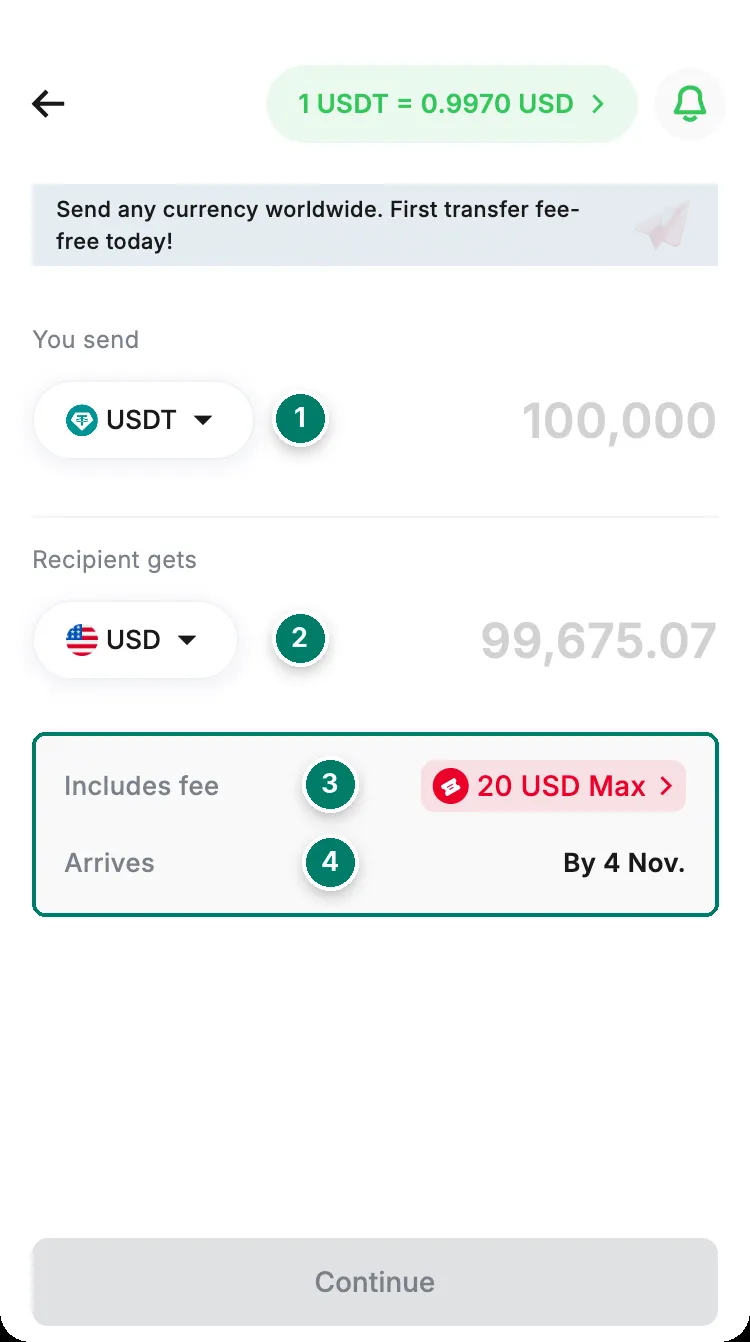
- You send: the crypto that leaves your balance. USDT by default; tap to change it.
- Recipient gets: the currency paid into the bank account or e-wallet. USD by default; tap to pick another.
- Includes fee: the transfer fee for that currency. For USD the app showed '20 USD Max' on 2 November 2026.
- Arrives: the estimated arrival date. It read 'By 4 Nov.' when we checked on 2 November.
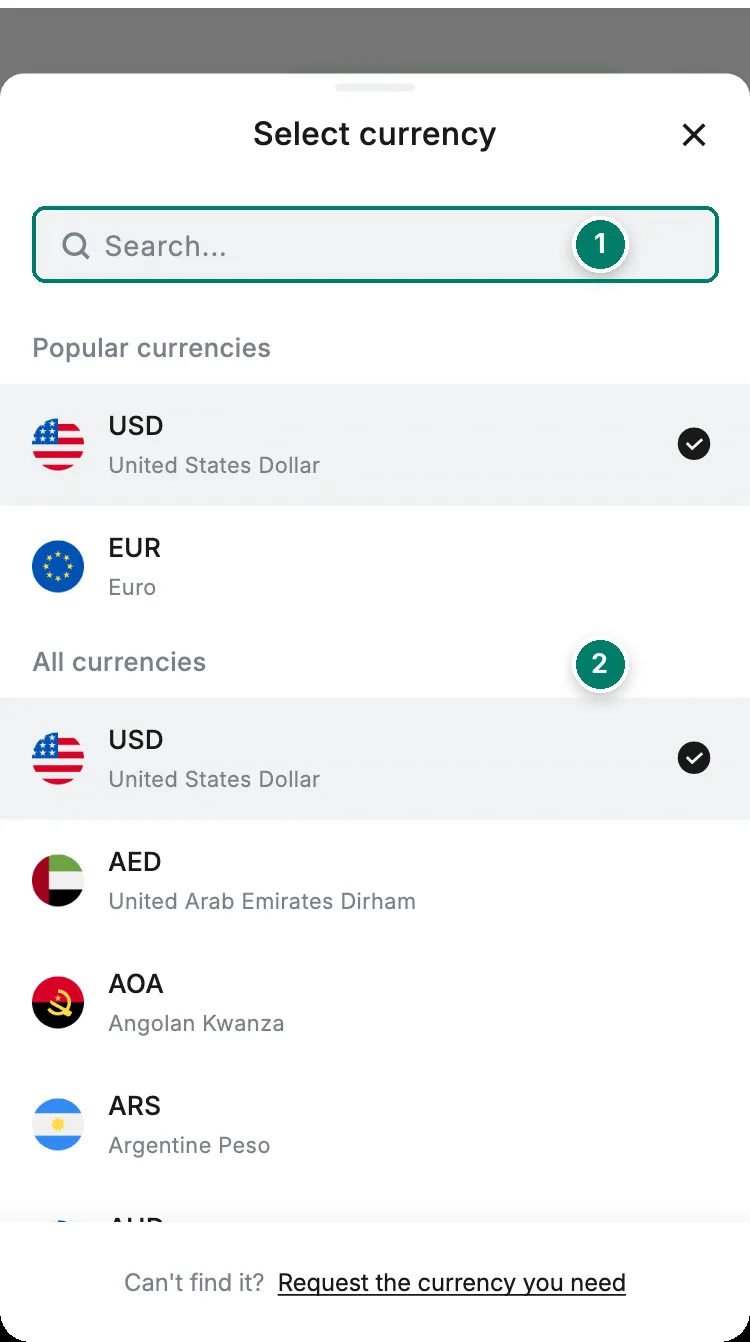
- Search by currency code or name.
- Popular currencies (USD and EUR), then All currencies in alphabetical order. The first entries we saw were USD, AED, AOA, ARS, AUD, BDT, BOB and BRL.
- Type the amount. The box below shows Includes fee and Arrives, and the rate pill at the top shows the live rate. Tap Continue.
- Choose a saved recipient, or add a new one by entering their bank account or e-wallet details. The name must be the account holder’s.
- Review everything and tap Confirm. The rate is locked at that moment, and from here the transfer can’t be cancelled.
The order then shows in your history with its status and arrival estimate. If it stays in a status you don’t understand, see what each transaction status means.
Fees and rates
- The transfer fee depends on the currency and receiving method. It’s shown on the Send screen as Includes fee before you commit, and RedotPay doesn’t publish a fee table; what it does publish about fees on deposits, withdrawals and P2P is on fees beyond the card. For USD the app showed “20 USD Max” on 2 November 2026; other currencies show their own figure.
- The rate is live until you confirm. RedotPay uses real-time rates, so if you wait on the review screen the amount can shift slightly. Once you tap Confirm, the rate is locked for that transfer.
- Banks on the way can take a cut. RedotPay says most local networks, naming Pix, SPEI and SEPA, charge nothing extra. For USD sent over SWIFT, an intermediary bank or the recipient’s bank may deduct a handling fee, so the recipient can receive less than you sent. The transfer itself is processed by a partner bank or payment provider chosen by currency and destination.
Limits
The minimum and maximum per transfer depend on the currency and payment method. They appear on screen when you enter the amount; RedotPay doesn’t publish them. The help centre also doesn’t state a daily or monthly cap for international transfers, so the per-transfer limit on screen is the only one to go by. Internal transfers to other RedotPay users have their own limits, listed below.
How long it takes
The estimate is under Arrives before you confirm, and it depends on the destination, currency and receiving method. For USD on 2 November 2026 the app showed “By 4 Nov.”, two days. RedotPay doesn’t publish times per country or currency. If a transfer fails, the money returns to your RedotPay balance automatically.
The first-send promo code
Your first send can be cheaper with someone else’s promo code. On the Send screen, tap Have a promo code?, enter the code and continue; the updated fee shows in the fee section. The rules, from the official article (checked 2 November 2026):
- The discount applies to the fee only, up to 20 USD, and the fee can drop to 0.
- It works on your first send only, and never with your own code. Each code is used once unless the offer says otherwise.
- After you complete a first send in EUR, GBP, USD, MYR, BRL, PKR, AED, THB or INR, your own code appears on the order details page. When someone uses it and completes their first send, you get a fee discount of up to 20 USD too. Unused discounts expire when the campaign ends.
- If a code is rejected, check the app is up to date, that you haven’t sent before, and that the campaign is still running. You can still send at the regular fee.
Recipients
You add a recipient during a transfer, with their account details. Afterwards, only the nickname can be changed: the name, account number, SWIFT code and other payment details are fixed. To change those, delete the recipient and add them again.
To edit or delete one, as the official guide describes: open Send, start a transfer, open the All tab on the Select recipient screen, swipe left on the recipient and tap Edit or Delete. The same screen has a search box, the filters All, Myself and Others, and an alphabetical index. No data means there’s no recipient in that category; Add recipient creates one. The Myself filter is where freelancers paying out to their own bank will find their account.
What can go wrong
- Invalid account details. The transfer fails and the money returns to your balance.
- Valid account, wrong person. If the details point to a real account that isn’t the one you meant, RedotPay can’t reverse the transfer. Contact the recipient’s bank right away.
- No cancellation. Once a transfer is being processed, it can’t be cancelled. Check the review screen carefully.
- No reference or memo. You can’t attach a note to the transfer. Tell the recipient separately what the payment is for.
- Business account. Not supported; make sure the account is held by an individual before you send.
- Less arrived than expected. For USD over SWIFT, see the intermediary-bank fees above. For other gaps, the rate moved before you confirmed.
Still stuck? Contact support with the order number.
Sending to another RedotPay user
The Send tab also moves crypto to another RedotPay account, without converting it. Choose the RedotPay user option, enter their email, phone number or UID, the amount, then Send and Confirm. From the official rules (checked 2 November 2026):
- It’s free and usually instant.
- Both of you must have a verified identity.
- It can’t be reversed. Check the recipient’s details before you confirm.
| Coin | Minimum per transfer | Maximum per transfer | Daily limit |
|---|---|---|---|
| USDT, USDC | 0.00000001 | 2,000 | 10,000 |
| USDs | 0.01 | 2,000 | 10,000 |
| ETH | 0.00000001 | 1 | 5 |
| BTC | 0.00000001 | 0.1 | 0.5 |
Internal transfers are paused for 24 hours after a password reset or an email or phone change, like withdrawals; see withdraw crypto. The person receiving still holds crypto, so this isn’t a cash-out: if they need local currency, they use Send or sell on P2P themselves.
Wondering how this compares with Wise or Payoneer for getting paid and paying yourself out? See RedotPay vs alternatives.