Most money lost on RedotPay isn’t taken by hackers breaking in. It’s sent by users who were talked into it. Ten minutes of setup and one rule protect you from almost all of it.
Set up your account in ten minutes
Open Profile → Security.
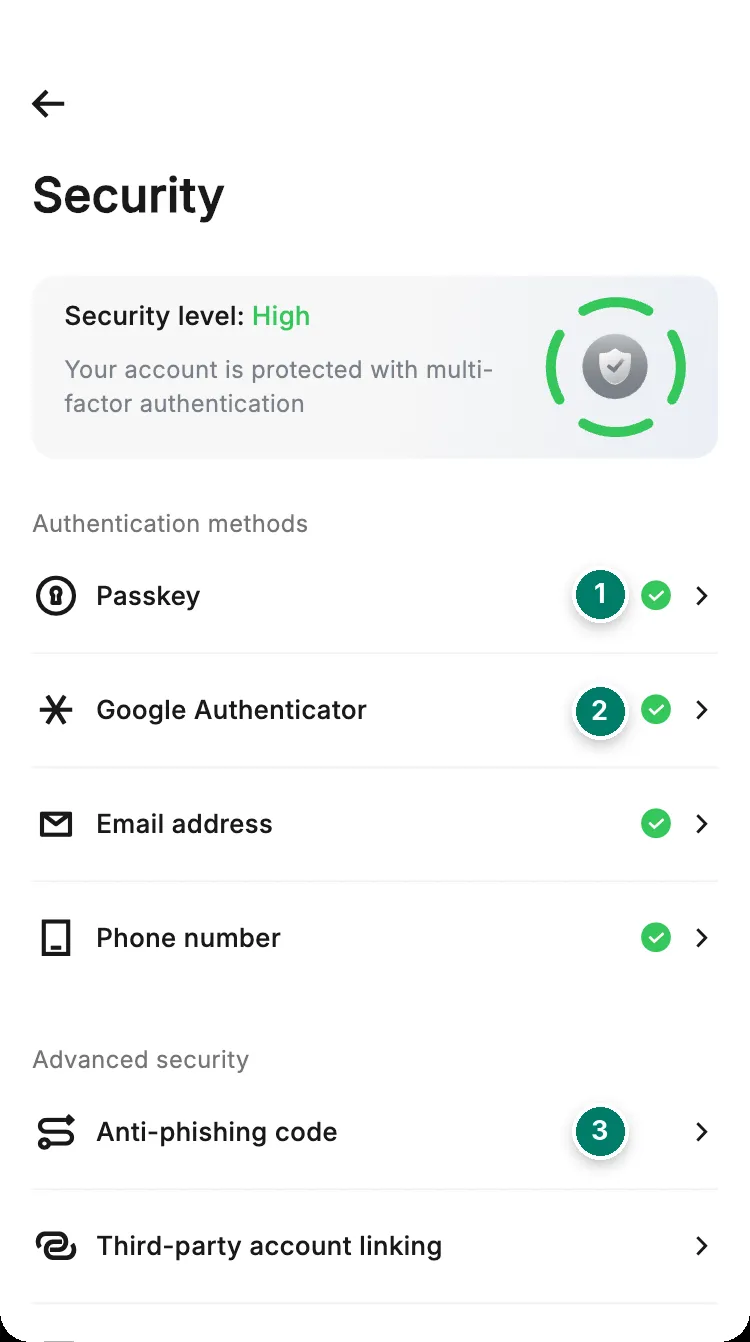
- Passkey: log in with your face or fingerprint instead of a password. Turn passkeys on in your phone's settings first.
- Google Authenticator: a code that changes every 30 seconds. Save the backup key somewhere safe: if you lose your phone, it's the only way back in.
- Anti-phishing code: a word you choose that appears in every real RedotPay email. An email without it is fake.
Then limit what a stolen card number can do. Under Card → Settings → Security settings, switch off what you don’t use.
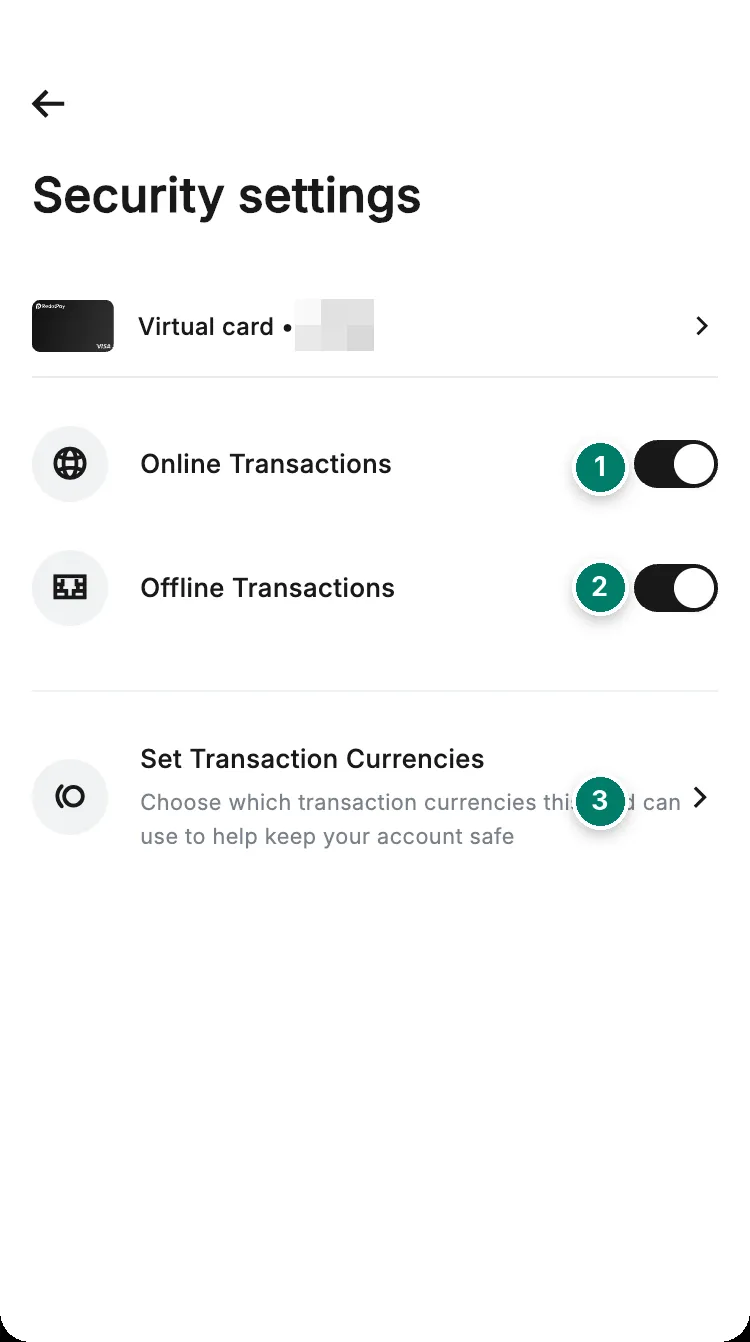
- Online payments. Off on a card you only use in shops.
- In-store payments. Off on a card you only use online.
- Only allow the currencies you actually pay in.
If Google Authenticator codes keep failing, set your phone’s date and time to automatic.
Security changes come with a 24-hour pause
After you reset your password or change your email or phone number, RedotPay pauses withdrawals, transfers to other users and currency conversions for 24 hours, and caps card spending at 1,000 USD. Changing Google Authenticator lowers the card limit to 1,000 USD for 24 hours too. If you didn’t make the change, act at once: see below.
Five wrong passwords lock the account for 24 hours and trigger an email alert. The card keeps working.
The scams RedotPay users meet
| What you see | What it really is |
|---|---|
| “RedotPay support” messages you on WhatsApp, Telegram or X | Fake. Support is the in-app chat, where official messages carry a badge, and email from @redotpay.com |
| Your funds are frozen and someone can release them for a fee | Fake. Nobody can unlock a review for money. See money held for review |
| An airdrop or bonus if you deposit first, such as 500 USDT for 1,000 | Fake. Real promotions are under Benefits in the app |
| A “stress test” wallet that pays 10% for sending 1,000 USDT | Fake |
| Email from addresses like @redotpay-support.com or @redotpay.vip | Fake. Real emails come only from @redotpay.com and show your anti-phishing code |
| A link to “verify your account” or “avoid suspension” | Phishing. Type redotpay.com yourself, and install the app only from the App Store or Google Play |
| A website asks you to connect your wallet and approve a transaction | It can drain the wallet. Approve only on sites you trust |
| Guaranteed returns, or someone offering to convert your crypto outside the app | Fake |
Verification codes can arrive by WhatsApp or Telegram. Those are one-way messages. Nobody from RedotPay will chat with you there.
P2P tricks
When you sell on P2P, the buyer’s money must be in your bank account before you release the crypto. Check in your own banking app, not on a screenshot or an SMS.
- Fake proof of payment: an edited screenshot or receipt.
- Fake SMS: a text that looks like your bank’s.
- Refund trick: money from someone else’s account or a cheque that later bounces, followed by a “refund” request.
- Off-platform deal: the trader moves you to Telegram or WhatsApp, where RedotPay can’t protect you.
More in buying USDT on P2P.
If you think your account is at risk
- 1Freeze your cardsCard → Freeze
- 2Change your passwordAnd reset Google Authenticator
- 3Disable the account if neededSecurity → Manage account → Disable account
- 4Tell supportIn the app, with what happened
- Disabling the account needs a verification code. Enabling it again needs a face scan. Deleting it for good is a different, 15-day process: see delete your account.
- Lost your phone? Use your Google Authenticator backup key on a new phone. If you’ve lost access to your email or phone number too, contact support.
- Unknown card payment? See a charge you didn’t make.
Report a scam
Save the scam email as an .eml file (“Download message” or “Show original” in your mail app) and submit it, with screenshots, on RedotPay’s official verification page. Then tell support in the app, with the scammer’s addresses, links and account names. See contacting support.