Deleting a card can’t be undone: the card fee isn’t refunded, and refunds to that card may never reach you. Your balance isn’t touched, because it belongs to your account, not to the card. If you only want to stop the card for a while, freeze it instead. Leaving RedotPay altogether is a bigger step with a 15-day wait: see delete your account.
Which one you need
| You want to | Do this | Can you undo it? |
|---|---|---|
| Stop a card being used for now | Freeze it, or switch off payment types in Security settings | Yes |
| Get rid of one card for good | Delete the card, below | No |
| Pause the whole account | Disable the account | Yes, with a face scan |
| Leave RedotPay | Delete the account: 15-day wait, then permanent | Only within 15 days |
| Stop receiving bank transfers | Close your personal USD, EUR or GBP account, below | Apply again later |
The two account rows are covered in the account-deletion guide linked above.
Before you delete a card
- Cancel subscriptions with each merchant. RedotPay can’t cancel them for you. Otherwise they keep trying the card, and failed charges can cost you a decline fee.
- Wait for pending payments and refunds. Anything still Authorized, and any refund a merchant promised, should arrive first: refunds go back to the card you paid with. See refunds that haven’t arrived.
- Download the card’s statements if you’ll need them. In the app: Card → … next to Transactions → download icon → choose the period → Export. The statement is emailed to you; its password is the last six digits of your phone number.
Delete a card
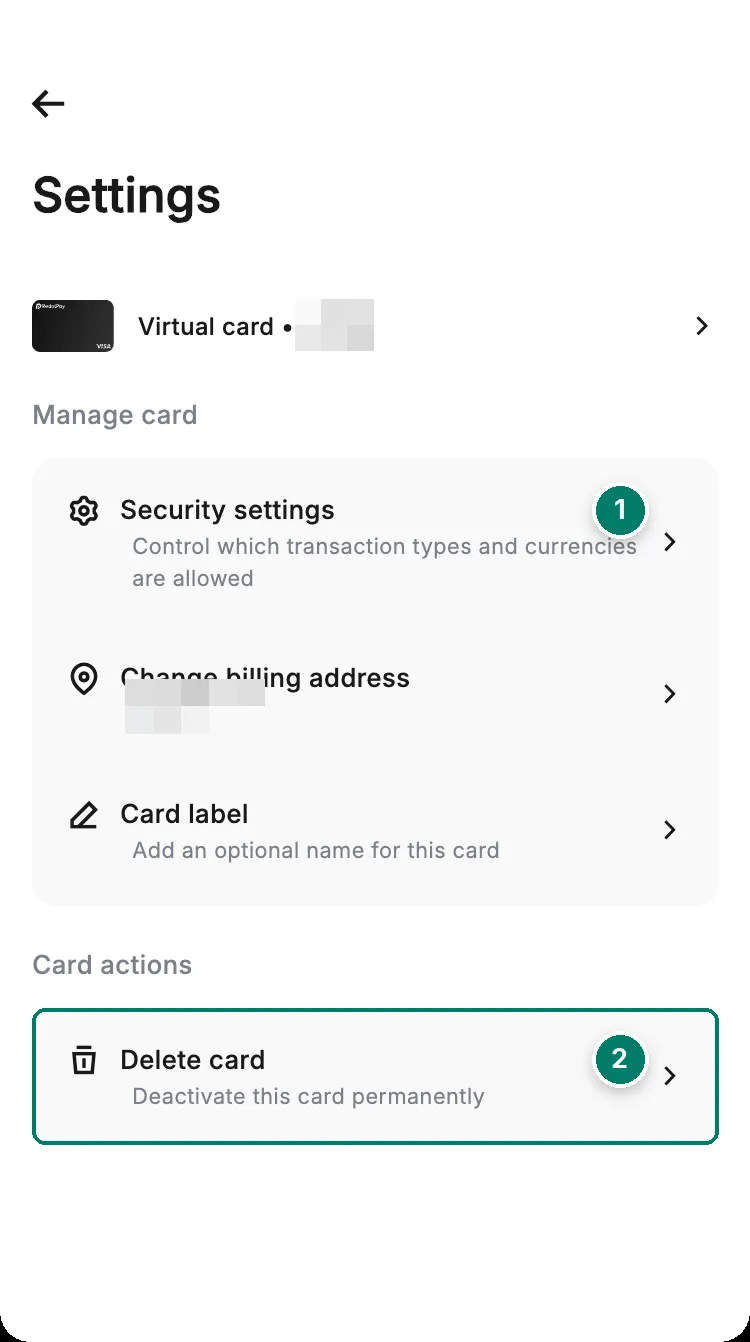
- Security settings: switch off online or in-store payments instead, if you only want to stop the card for a while.
- Delete card: permanent.
- 1Card → Settings → Delete card
- 2Choose a reasonThen tap Next
- 3Read the warningTap Delete, then Delete again
- 4Verify it's youThe card is deleted
What you lose:
- The card fee. The 10 USD or 100 USD you paid for the card isn’t refunded.
- Refunds to that card. Refunds go back to the card you paid with. RedotPay can’t promise one will reach you once that card is deleted.
- The card itself. It can’t be restored.
Your balance, your account and your other cards stay as they are.
Disable or delete the whole account
Both live under profile icon → Security → Manage account. Disabling pauses the account and is reversed with a face scan. Deleting starts a 15-day countdown, after which every card, your transaction history and any balance left are gone for good, and the same identity can never open another RedotPay account. The checklist, the steps and the screenshots are in the account-deletion guide linked above. If someone else may have access to your account, start with protect your account.
Close a personal USD, EUR or GBP account
These are the account details you use to receive bank transfers. You don’t have to close one: RedotPay says it tidies up inactive accounts on its own. To close it yourself, tap the USD, GBP or EUR account → … at the top right → Close account. To get one back later, you apply again.